For most of my career a big data center was 20 or 30 megawatts. You planned it around the network and the servers, and you sent the facility questions to someone in another building. That doesn’t work any more. The sites being built now are measured in gigawatts, a single rack can draw more than a whole row used to, and the first question in a design meeting is often “where does the power come from?”, not “which switch?”.
NVIDIA calls these sites AI factories. It’s a marketing name, but a fair one: power and data go in, trained models and tokens come out, and the whole thing is judged on output per watt and per dollar. This article is the tour I wish I’d had when I started working on them. It goes from the grid connection to the GPU, with the network in the middle where it belongs.
In short
- The size has changed by two orders of magnitude. The biggest sites run today at around 1 GW of IT power; several planned for 2027 and 2028 approach 2 GW.
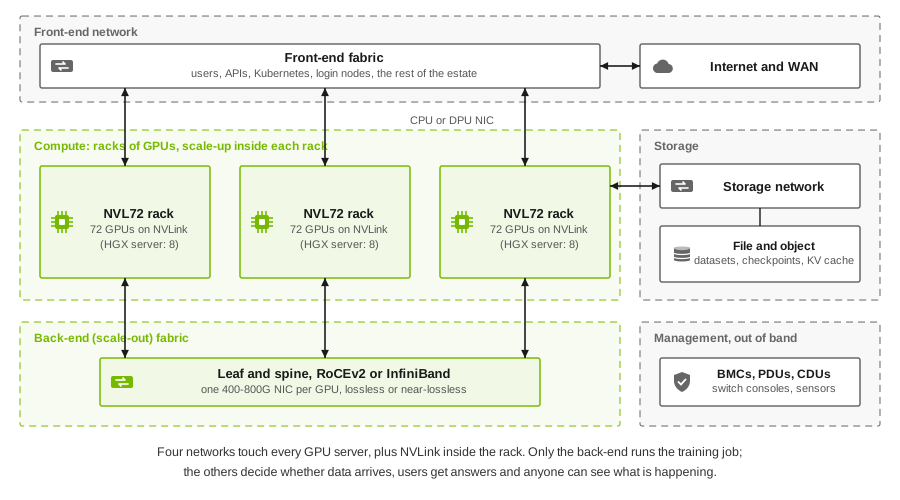
- One AI factory carries five networks: NVLink inside the rack, the back-end fabric for training, the front-end, storage and out-of-band management. Each has a different job, and you shouldn’t build them all the same way.
- Power and cooling set the design now. Racks went from about 10 kW to 120-140 kW in a few years. 1 MW racks on 800 V DC are announced for 2027, and liquid cooling is no longer optional.
- The money is mostly in the GPUs. Estimates for one gigawatt run from about $35 billion to $60 billion, and the hardware ages three or four times faster than the building it sits in.
What makes it a factory
A traditional data center hosts many unrelated applications. Each one is small compared with the building, and if one server fails nobody outside that team notices. An AI factory is closer to one machine. A training job can span tens of thousands of GPUs that move in lockstep, so the slowest link, the hottest rack or the weakest power feed decides how fast the whole job runs. I’ve written about that effect on the network side in one link fails, every job slows. The same logic applies to every layer underneath.
So the design method changes. You don’t size each layer for the average and hope. You trace one requirement, usually “this many GPUs, working as one, this many hours a day”, down through the network, the power chain and the cooling loop, and you look for the layer that breaks first.
How big they are now
Epoch AI keeps the most careful public tracker of large AI sites. It builds estimates from satellite imagery, permits and company statements, and gives uncertainty bands of about 1.4 times either way. Treat the numbers as good estimates, not meter readings.
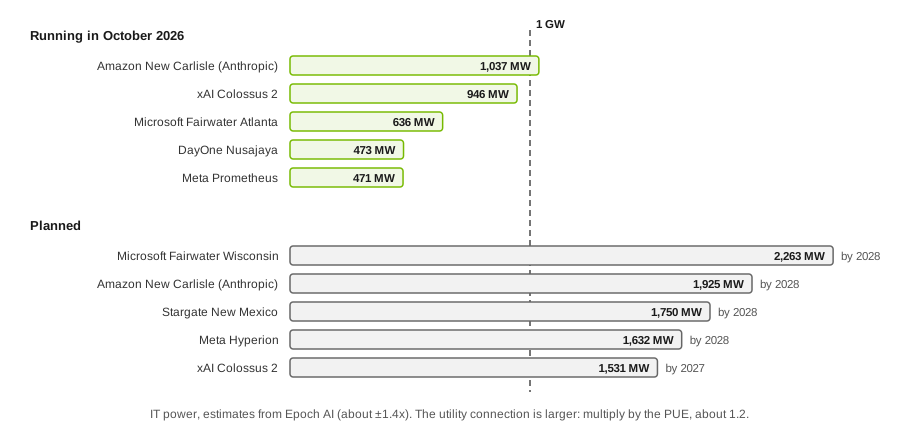
A gigawatt is about the output of one large nuclear reactor. The figures above are IT power, what the servers and switches draw. The connection to the grid is larger, because cooling and conversion losses come on top. The ratio is the PUE, about 1.2 at the hyperscalers, so a 1 GW IT site needs roughly 1.2 GW from the utility.
In GPU terms, NVIDIA’s own sizing example for Vera Rubin puts about 40,000 GPUs in a 100 MW AI factory. Scale that to a gigawatt and you’re in the hundreds of thousands of GPUs at one site. Microsoft describes Fairwater as one flat network joining “hundreds of thousands” of Blackwell GPUs, and it links its Fairwater sites over a dedicated AI WAN built on more than 120,000 miles of new fiber. So the unit of design isn’t even the building any more. It’s a group of buildings, sometimes in different states, acting as one training cluster.
For context, the IEA estimates that all the world’s data centers used about 415 TWh in 2024, around 1.5% of global electricity, and expects that to more than double to about 945 TWh by 2030. AI is the main reason for the growth.
Key point. When someone says “a 1 GW site”, ask whether they mean IT power or the grid connection, and whether it’s running, under construction or a press release. Those three can differ by years.
Anatomy: five networks, not one
This is the part most people get wrong when they first draw an AI factory. They draw one big fabric. There are really five, and they have very different requirements.
The compute, and who makes it
NVIDIA still sells most of the accelerators, and its rack-scale systems set the template everyone else follows:
| Platform | Scale-up domain | Status, October 2026 |
|---|---|---|
| NVIDIA GB200 and GB300 NVL72 | 72 Blackwell GPUs per rack on NVLink | Shipping in volume |
| NVIDIA Vera Rubin NVL72 | 72 Rubin GPUs and 36 Vera CPUs; NVLink 6 at 3 TB/s per GPU; 288 GB HBM4 per GPU | Ramping into full production |
| AMD Helios | 72 MI450-series GPUs; UALink tunneled over Ethernet for scale-up | Volume in the second half of 2026 |
| Google Ironwood TPU | Pods of up to 9,216 chips joined by optical circuit switches | Available on Google Cloud |
| AWS Trainium3 UltraServer | Up to 144 Trainium3 chips | Available on AWS |
The pattern is the same everywhere. A rack (or a pod) is now the smallest unit you buy, not a server. Inside it, the accelerators share a very fast memory-semantic fabric. Outside it, they talk over a network you build. If you want the background on why GPUs and TPUs look so different inside, I covered it in CPU, GPU and TPU.
Scale-up: inside the rack
NVLink, and its competitors UALink and Google’s inter-chip links, let the GPUs in one domain read and write each other’s memory as if it were local. The bandwidth is far above anything on the scale-out side: on Vera Rubin, NVLink gives each GPU 3 TB/s, while its scale-out networking gives it 0.45 TB/s, counting both directions. Roughly 6.7 to one, against about nine to one on GB300 NVL72. That’s why model parallelism, the chattiest part of training, is kept inside the rack. My article on where the GPU’s own network ends goes through that boundary in detail.
If you’ve worked with HGX or DGX servers, 72 GPUs on NVLink probably looks wrong. It’s a fair reaction. In those servers the NVLink switch chips sit on the GPU board, so the NVLink domain ends at the server’s metal: 8 GPUs. The rack-scale systems move the switch chips out of the servers entirely. A GB200 NVL72 rack has 18 compute trays, each with 4 GPUs and 2 Grace CPUs and no NVLink switch at all, and 9 NVLink switch trays carrying 18 switch chips between them. Every GPU has 18 NVLink links, and each one runs to a different switch chip over copper cartridges at the back of the rack, more than 5,000 cables in all. Every switch chip therefore has a link to every GPU, and any GPU reaches any other through a single chip.
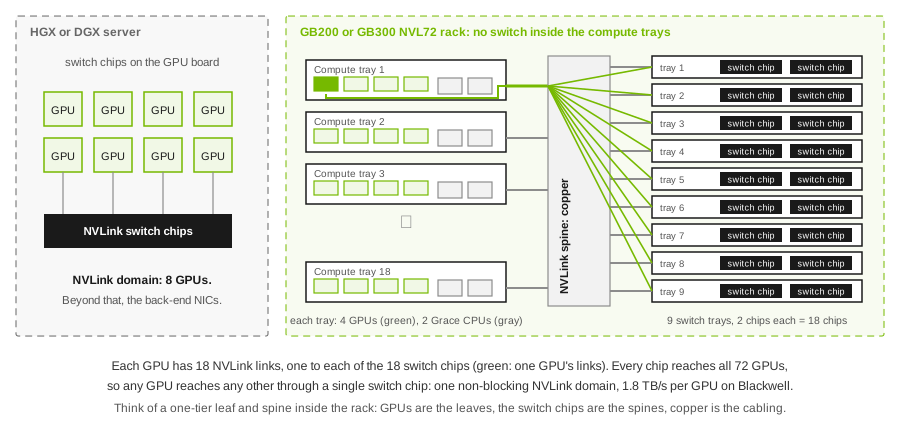
As a network engineer I find it easiest to read as a one-tier leaf and spine squeezed into a rack: the GPUs are the leaves, the switch chips are the spines, and copper does the cabling because nothing is more than a couple of meters away. That’s also why these racks are so dense and liquid-cooled. Spread the same 72 GPUs over several racks and the copper no longer reaches.
For a network engineer, the scale-up domain is mostly a given. You don’t design NVLink. But its size decides how much traffic is left for you to carry, and that’s the next network.
Back-end: the training fabric
This is the network that runs the job. Every GPU gets its own NIC, at 400G or 800G today, and the fabric connects them all in a 1:1 leaf-and-spine with full bisection bandwidth (or three tiers, at the largest sizes). It carries the collectives, all-reduce and friends, between racks. That traffic is synchronized, bursty and very sensitive to the slowest path.
The choice is InfiniBand or Ethernet with RoCEv2, and the momentum is with Ethernet. Microsoft’s Fairwater back-end is a two-tier Ethernet fabric at 800 Gb/s per GPU running its own SONiC switch software, and AMD’s Helios is built around Ethernet and Ultra Ethernet NICs. I compared the two options in InfiniBand or RoCEv2, and the 2,048-GPU reference design shows what a full back-end design looks like on paper.
Front-end: everything else
The front-end connects the GPU servers to the rest of the world: users, inference APIs, Kubernetes control planes, login nodes, the WAN. It looks like a normal data-center network, and that’s the trap. It gets designed last and gets whatever switches are left in the budget. Then the first big inference launch arrives, or someone pulls a dataset through it at full speed, and the front-end becomes the bottleneck nobody modeled.
More of the front-end is moving into the server itself. DPUs such as NVIDIA’s BlueField take over security policy, tenant isolation and storage access from the host CPU. In a multi-tenant cloud that’s the only practical place to enforce isolation at these speeds.
Storage
Training reads a dataset once per pass and, every so often, writes a checkpoint of the whole model state. Both are bursty. NVIDIA’s DGX SuperPOD reference architecture gives about 4 GB/s per GPU for read-heavy workloads, and suggests write performance of at least half the read rate for large language models, because the job waits while a checkpoint is written. Multiply by 100,000 GPUs and you can see why storage gets its own fabric and why parallel file systems and GPUDirect Storage, which reads straight into GPU memory, are standard.
Inference adds a newer storage tier: the KV cache, the model’s working memory of a conversation. More on that in the next section.
Management
The out-of-band network carries the BMCs, the switch consoles, the PDUs and now the CDUs and leak sensors of the cooling system. It’s slow and boring, and it’s what you use when everything else has failed. In a liquid-cooled hall it’s also how you find out a pump has stopped. Build it separately, on its own power if possible, and test it.
Key point. Five networks, five sets of requirements. The back-end needs bandwidth and predictable latency, the front-end needs reach and security, storage needs burst capacity, and management needs to still work when nothing else does.
Training and inference are different factories
For a few years “AI data center” meant training. That’s changing fast. Inference, running the trained model for users, is now where most of the new tokens are produced, and reasoning models that “think” before answering produce far more of them per question.
| Training | Inference | |
|---|---|---|
| Unit of work | One huge job, weeks long | Millions of small requests, milliseconds to minutes each |
| What matters | Job completion time | Time to first token, tokens per second per user, cost per token |
| Network traffic | Collectives on the back-end, synchronized | Requests on the front-end; KV-cache moves on the back-end |
| Failure impact | One bad link slows every GPU in the job | One bad server drops some requests; the rest carry on |
| Location | Wherever power is cheap and plentiful | Often closer to users, but the biggest models still need big sites |
The interesting change is inside inference. Serving a large model has two phases. Prefill reads the whole prompt and is compute-heavy. Decode produces the answer one token at a time and is memory-bound and latency-sensitive. Frameworks such as NVIDIA Dynamo now split them onto separate pools of GPUs, and move each request’s KV cache from the prefill GPUs to the decode GPUs over RDMA. Dynamo can also push less-used KV blocks out of GPU memory into CPU memory, local SSD or networked storage, and route each new request to the GPU most likely to have its context cached already.
In plain terms, inference now has east-west traffic that looks a lot like training, plus a storage workload that didn’t exist two years ago. If you’re building an “inference-only” site with a cheap back-end, I’d think hard about that.
Power: the constraint that decides everything
Here’s the uncomfortable truth for network people: in most of the AI factory projects I see, the network isn’t the long pole. Power is. A large grid connection can take years to get, and the sites in the chart above are being built where power can be found, sometimes with their own generation on site.
Inside the building, the problem is density. Uptime Institute’s 2025 survey found that 82% of operators’ densest racks were still below 30 kW, and only 9% had any rack at 50 kW or more. Against that, a GB200 or GB300 NVL72 rack draws around 120-140 kW. Microsoft quotes about 140 kW per rack and 1,360 kW per row at Fairwater. Most existing data centers simply cannot take these racks without being rebuilt.
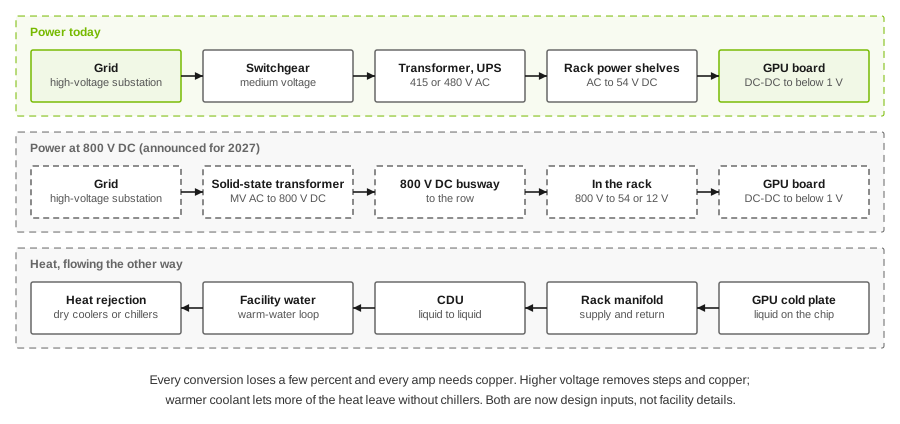
And it’s still climbing. NVIDIA has said that today’s 54 V rack power distribution runs into physical limits beyond about 200 kW per rack. Its answer is 800 V DC distribution from the facility to the rack, announced to arrive with its Kyber racks in 2027 and designed for racks of 1 MW. NVIDIA claims up to 5% better end-to-end efficiency and about 45% less copper. The physics behind it is simple: for the same power, a higher voltage means less current, and less current means thinner cables and smaller losses.
There’s a second power problem that surprised me the first time I saw it: the load swings. A training job has every GPU compute, then every GPU communicate, in lockstep. At hundreds of megawatts, the whole site’s draw rises and falls in time with the job, and utilities don’t like that. Microsoft describes three mitigations at Fairwater: background work to fill the gaps, power limits enforced on the GPUs, and on-site energy storage. Interestingly, at the Atlanta site it also skips UPS and on-site generators for the GPU fleet and relies on highly available grid power. That’s a cost decision: GPU work can be checkpointed and restarted, so it doesn’t need the same protection as a bank’s database.
Key point. Ask about the power chain as early as you ask about the switches. Rack density, voltage and redundancy decide your rack layout, your cable lengths and therefore your optics. The network design inherits them.
Cooling: air is out
You can’t cool 130 kW with air in a normal rack footprint, which is why every rack-scale GPU system at this density is liquid-cooled. The common method is direct-to-chip: cold plates sit on the GPUs and CPUs, a manifold in the rack carries the coolant, and a coolant distribution unit (CDU) exchanges heat between that loop and the facility water. Fans still cool the leftover components, but most of the heat goes into liquid.
Three trends are worth knowing:
- Warmer water. NVIDIA’s Vera Rubin NVL72 specification lists a 45 °C inlet temperature. Warm coolant means more of the year can be handled by dry coolers instead of chillers, which saves power and water.
- Closed loops. Microsoft says its new sites fill a closed liquid loop once at construction, about the yearly water use of 20 homes, and don’t evaporate water after that.
- Immersion cooling, with whole servers in a dielectric liquid, works and has loyal supporters, but so far direct-to-chip has won the large GPU deployments because it fits the vendors’ rack designs.
What this means for us: liquid manifolds and CDUs compete with cable trays for space at the top and back of the rack, and a leak is now a network outage too. The rack layout is negotiated between the cooling team, the power team and the network team. It’s no longer handed to you.
Optics and co-packaged optics
The other place power goes is the optics. A large back-end can have hundreds of thousands of transceivers, and NVIDIA puts a pluggable at around 30 W per port. Co-packaged optics (CPO) move the optical engine onto the switch package itself, and NVIDIA claims about 9 W per port, 3.5 times less power, with fewer parts to fail.
This isn’t a slide any more. NVIDIA planned Quantum-X Photonics InfiniBand switches for early 2026 and Spectrum-X Photonics Ethernet switches for the second half of 2026, and by mid-2026 TrendForce reported Spectrum-X CPO switches shipping to selected partners, with Broadcom also shipping CPO in limited volume. The trade-off is serviceability: you can’t swap a failed laser by pulling a module, so the design keeps the lasers in separate replaceable units. I’d want to see a year of field failure data before I put CPO in a design that doesn’t have a fallback.
Capital: what a gigawatt costs
The numbers are big enough to sound fake, so here are the sources side by side:
| Estimate | Cost of 1 GW | Notes |
|---|---|---|
| NVIDIA (Jensen Huang) | $50-60 billion | About $35 billion of it NVIDIA systems |
| Foxconn | Up to $47 billion | For a Vera Rubin build |
| Epoch AI model | About $38 billion capex | Plus about $0.9 billion a year in operating cost |
| Bernstein | About $35 billion | GPUs about 39% of the total; mechanical and electrical about a third |
The range comes from what’s counted and which GPU generation is assumed, but the shape is consistent: most of the money is in the compute, and the building, power and cooling are the smaller part. On the spending side, the four largest US hyperscalers are expected to invest somewhere around $700-750 billion in capital expenditure in 2026, depending on whose tally you read.
The detail I find most useful for design is the mismatch in lifetimes. A building and its power infrastructure are written off over decades. GPUs are economically superseded in a few years. So the building will see three or four generations of compute, each denser and hotter than the last. The networking sits in between: cabling and pathways should last as long as the building, while switches and optics follow the GPU cycle. Design the cable plant for the rack you’ll install in 2030, not the one you’re installing now.
Key point. Spend design effort where the lifetime is long: power distribution, cooling capacity, cable pathways and floor loading. Those are the expensive mistakes. The switch you pick today will be replaced anyway.
Where it’s heading
I’ve marked each item with how sure we can be. Roadmaps slip, and I’d rather be honest about it.
| Trend | Status |
|---|---|
| Liquid-cooled racks of 120-140 kW | Shipping. The default for high-end GPUs |
| Vera Rubin NVL72, AMD Helios | Shipping or ramping in 2026 |
| Co-packaged optics in scale-out switches | Early shipping in 2026 |
| Ethernet for the largest back-ends, Ultra Ethernet NICs | Shipping, early. See Ultra Ethernet in plain English |
| Multi-site training over a dedicated AI WAN | In production at Microsoft; others announced |
| 800 V DC power and racks around 1 MW (NVIDIA Kyber) | Announced for 2027; some reports suggest it could slip |
| UALink as an open scale-up standard | Announced, first products tunneled over Ethernet |
| Sites above 2 GW, on-site generation as the norm | Speculative. Depends on grids, financing and demand holding up |
The direction is clear even if the dates move: denser racks, higher voltage, more liquid, more optics on the package, and bigger sites joined together. The network gets more important as that happens, because it’s what lets several buildings behave as one machine.
What I would check as the architect
If I’m brought into an AI factory project, these are the questions I ask before drawing any network:
- Power, honestly. IT megawatts, grid megawatts, the date each tranche is really available, and the redundancy model. Is the GPU fleet on UPS or not?
- Rack density and the next generation. What kW per rack is designed today, and what can the power and cooling take in three years?
- Cooling interface. Direct-to-chip with CDUs in the rack or in the row, the supply temperature, and who owns a leak at 3 a.m.
- Scale-up size. 8, 72 or 144 GPUs per domain changes how much traffic the back-end carries.
- Five networks, five designs. A separate requirement and an owner for back-end, front-end, storage and management, plus how the scale-up domain connects to them.
- Training, inference or both. If inference, plan for KV-cache traffic and its storage tier, not just front-end requests.
- Optics and cable plant. Reach from the rack layout, pluggable or CPO, and pathways sized for the generation after this one.
- Acceptance. How the whole thing, power and cooling included, will be proven under a real synchronized load before the first customer job.
What would change my mind: if inference really moves out to many smaller sites near users, the gigawatt campus stops being the model and the WAN becomes the hard part. And if the 800 V DC and 1 MW rack plans slip far enough, today’s 120-140 kW liquid-cooled rack may be the stable design for longer than the roadmaps suggest. I’ll update this article as the evidence comes in.
References
- Epoch AI, Largest AI data centers by power capacity, data as of October 2026: IT power estimates, running and planned, with uncertainty.
- Epoch AI, AI data center cost breakdown: the 1 GW capex and opex model.
- IEA, Energy and AI: executive summary, April 2025: 415 TWh in 2024, about 945 TWh by 2030.
- NVIDIA, Vera Rubin NVL72: GPU, NVLink 6 and HBM4 figures, the 100 MW sizing example and the 45 °C inlet.
- NVIDIA, 800 V HVDC architecture will power the next generation of AI factories, May 2025: 54 V limits, 1 MW racks, efficiency and copper claims.
- NVIDIA, Scaling AI factories with co-packaged optics: 30 W versus 9 W per port, availability plans.
- TrendForce, CPO enters mass production, July 2026: Spectrum-X and Broadcom CPO shipments.
- NVIDIA, DGX SuperPOD storage architecture: per-GPU read guidance and checkpoint writes.
- NVIDIA, Dynamo: disaggregated serving and the Dynamo repository: prefill and decode on separate workers, NIXL transfers, KV cache offload.
- Microsoft, Inside the world’s most powerful AI datacenter, September 2025, and Infinite scale: the architecture behind the Azure AI superfactory, November 2025: rack and row power, closed-loop cooling, two-tier Ethernet back-end, AI WAN, power swings.
- NVIDIA, NVIDIA contributes NVIDIA GB200 NVL72 designs to the Open Compute Project, and the GB200 NVL72 page: 18 compute trays, 9 switch trays, over 5,000 copper cables, a 72-GPU NVLink domain at 1.8 TB/s per GPU.
- AMD, Helios rack-scale platform: MI450, UALink over Ethernet, Ultra Ethernet NICs.
- Google, Ironwood: the first Google TPU for the age of inference: 9,216-chip pods.
- Amazon, Trainium3 UltraServer: up to 144 chips per UltraServer.
- Data Center Knowledge, For high-density AI, available data center space may not be usable: Uptime Institute 2025 rack-density figures.
- Cost per gigawatt: Huang’s $50-60 billion estimate and Bernstein’s $35 billion, and Foxconn’s figure for Vera Rubin. 2026 hyperscaler capex: Tom’s Hardware. These are press reports of analyst and executive statements; the companies’ own filings are the final word.