
For most of my career a server was something that plugged into a switch port, and what happened inside it was somebody else’s problem. AI changed that. Every network in an AI data center exists to serve one thing: the accelerators, the GPUs or TPUs that do the actual math. An idle accelerator costs the same as a busy one, so the network’s job is to keep them busy. You can’t design that network well without knowing what these chips are, why they’re so different from the CPUs we’ve used for decades, and how they work together. So here’s the version I wish someone had given me.
In short
- A CPU has a few very capable cores. It’s brilliant at doing anything, one step at a time.
- A GPU has thousands of simple arithmetic lanes. It’s brilliant at doing the same thing to huge amounts of data at once.
- A TPU is a chip built for one operation, matrix multiplication, wired directly into silicon. It does that one thing with remarkable efficiency.
- In an AI cluster they work as a team: CPUs organize, accelerators compute, the network keeps them in sync.
The picture first: three kinds of kitchen
Imagine you need ten thousand identical sandwiches.
- The CPU is a team of a few master chefs. Each one can cook any recipe in the book, improvise, and handle a complicated order with many steps. But there are only a handful of them. Ten thousand identical sandwiches will take a long time.
- The GPU is a huge kitchen brigade. Thousands of cooks who can each do only simple steps, but all at the same moment: a thousand slices of bread buttered in one go. For a complicated, step-by-step recipe they would be slow. For identical sandwiches, unbeatable.
- The TPU is a sandwich assembly line. Built for one product. Bread enters one end, ingredients enter from the side, finished sandwiches come out the other end, with almost no wasted movement. Ask it for soup and it can’t help, but for sandwiches it uses less energy per sandwich than anyone else.
AI training is ten thousand identical sandwiches, billions of times over. That’s why it moved from CPUs to GPUs and TPUs.
Why AI is “the same operation, billions of times”
A neural network is mostly layers of numbers. Running a layer means multiplying a batch of inputs by the layer’s weights, the numbers the model has learned. That’s a matrix multiplication: every output value is a sum of many multiplications.
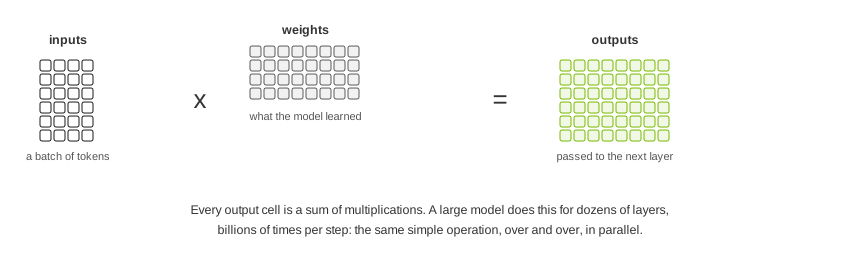
A large language model repeats this for dozens of layers, for every token in the batch, forward and then backward to learn. Each individual multiplication is trivial. There are just astronomically many of them, and they are independent of each other, so they can all happen at the same time. Hardware that does many simple operations in parallel wins.
Inside the three chips
CPU: the generalist
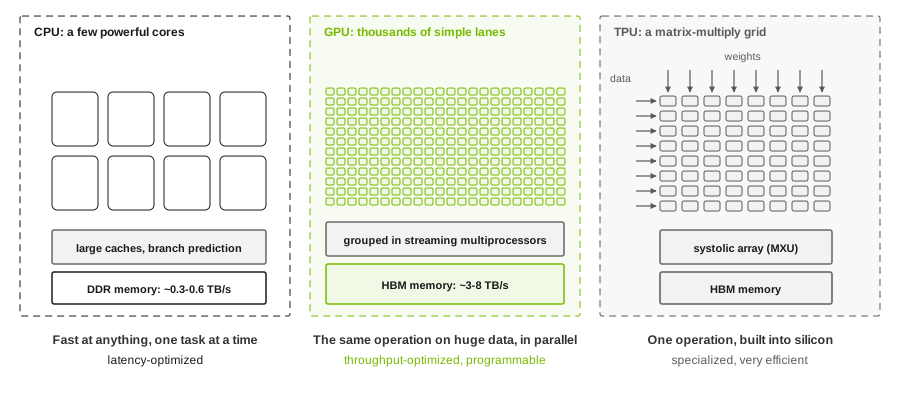
A server CPU has from a few dozen to around two hundred cores. Each core is a sophisticated machine: it predicts which way the program will branch, executes instructions out of order to avoid waiting, and keeps large caches close by. All that cleverness exists to finish one sequence of instructions as fast as possible. That’s latency-optimized design.
CPUs read their main memory (DDR) at roughly 0.3 to 0.6 TB/s per socket. That’s plenty for databases and web servers, and far too little to feed AI math at full speed.
GPU: the parallel workhorse
A GPU trades cleverness for numbers. Instead of a few complex cores, it has thousands of simple arithmetic lanes, grouped into units called streaming multiprocessors (NVIDIA) or compute units (AMD). Each unit also contains dedicated matrix engines (tensor cores, matrix cores) that perform small matrix multiplications in one step. Many lanes execute the same instruction on different data at the same time. That’s throughput-optimized design.
To keep those lanes fed, a data center GPU sits next to stacks of HBM (high-bandwidth memory) delivering roughly 3 to 8 TB/s on current generations, ten times what a CPU socket gets. GPUs are also programmable: CUDA and ROCm let researchers write new kinds of models without waiting for new hardware. That flexibility is the main reason GPUs dominate AI today.
TPU: the specialist
Google designed the TPU (Tensor Processing Unit) specifically for the matrix math of neural networks. Its heart is a systolic array: a large grid of multiply-and-add units: 128 by 128 in the generations before v6e, and 256 by 256 from v6e onward, according to Google’s documentation. Data flows in from one side, weights from the other, and partial results pass from cell to cell like water through a pipe network, so each value read from memory is reused many times. Less data movement means less energy per operation.
TPUs also use HBM, support the low-precision number formats AI relies on (bfloat16 was in fact introduced with them), and are programmed through compilers (XLA, used by JAX, TensorFlow and PyTorch) rather than hand-written kernels. They are offered mainly through Google Cloud.
The TPU is one example of a broader family of AI ASICs (chips designed for one purpose). AWS has Trainium and Inferentia, and phones and laptops now include small NPUs for running models locally. The same trade-off applies to all of them: specialization buys efficiency and gives up flexibility.
Pros and cons
| CPU | GPU | TPU | |
|---|---|---|---|
| Built for | Any task, step by step | The same operation on lots of data | Matrix multiplication for neural networks |
| Strengths | Flexible; great at branching, control and I/O; runs every operating system and application | Massive parallel math; programmable; huge software ecosystem (CUDA, PyTorch); available from several vendors and every cloud | Excellent performance per watt for matrix math; chip-to-chip links built in; scales to very large pods |
| Weaknesses | Far too slow and power-hungry for large-scale AI math | Expensive; 700 W to over 1,000 W per chip; needs a CPU host and a very capable network | Less flexible; mostly available through one cloud; best results need compiler-friendly models |
| Role in an AI cluster | Orchestration, data loading, scheduling, storage and network I/O | Training and inference compute | Training and inference compute, mainly on Google Cloud |
| Memory | DDR, roughly 0.3 to 0.6 TB/s per socket | HBM, roughly 3 to 8 TB/s | HBM |
There’s no “best” chip. A GPU without CPUs can’t even start, and a TPU pod still has host CPUs managing it.
How it all works together in one server
A typical GPU server shows the division of labor clearly:
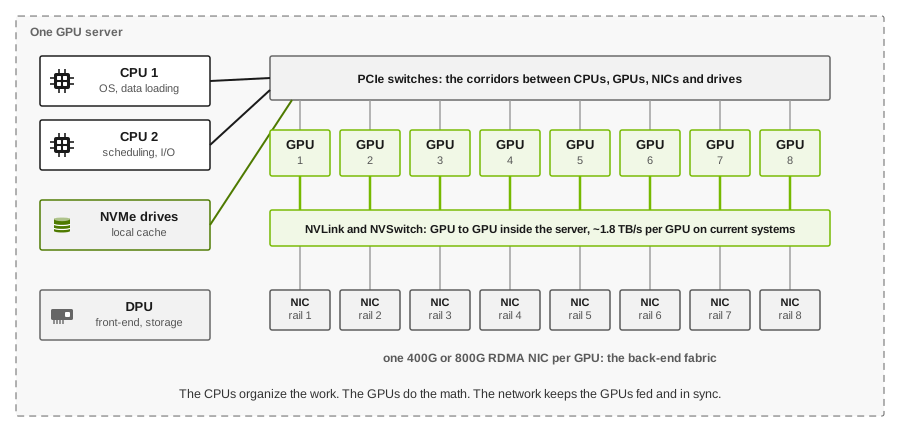
- The CPUs run the operating system and the training program, load and prepare data, and tell the GPUs what to do.
- The GPUs hold the model and do the math. Inside the server they talk to each other over NVLink and NVSwitch, a private network far faster than anything between servers.
- One network card per GPU connects each GPU to the back-end fabric, so GPUs in different servers can exchange data directly with RDMA, without involving the CPUs. Each card is on its own rail.
- A DPU (a network card with its own processors) often handles the front-end and storage networks, offloading security and storage work from the CPUs.
- PCIe switches are the corridors that connect it all. Keeping each GPU next to “its” network card on the same switch matters for performance.
One training step, end to end
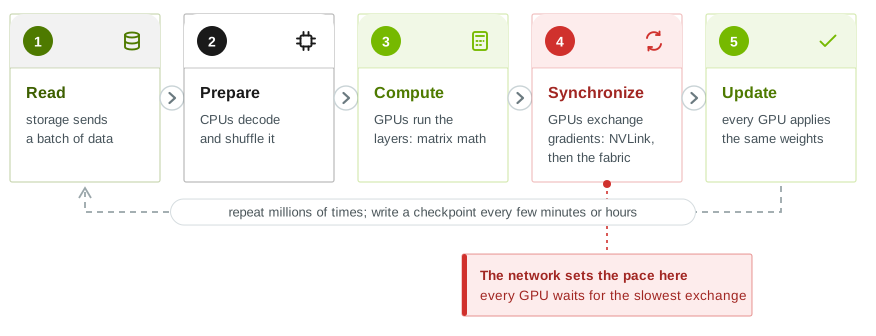
- Read. A batch of training data comes from storage, often straight into GPU memory with GPUDirect Storage.
- Prepare. CPUs decode, shuffle and batch the data.
- Compute. Each GPU runs the model’s layers on its share of the data: matrix multiplications, forward and backward.
- Synchronize. Every GPU has computed slightly different corrections (gradients). They must all agree before the next step, so they exchange and combine their results: first over NVLink inside each server, then across the back-end fabric. This is the all-reduce.
- Update. Every GPU applies the same combined update, and the next step begins.
Step 4 is why AI networks are different. Thousands of GPUs finish computing at about the same moment and then all wait for the exchange. The slowest link in the fabric sets the pace for every GPU in the job. A network that’s fine “on average” isn’t fine here. The six congestion points article shows where those slow links come from.
Two ways to network the accelerators
GPU clusters and TPU pods solve the same problem, fast collective communication, with very different network designs:
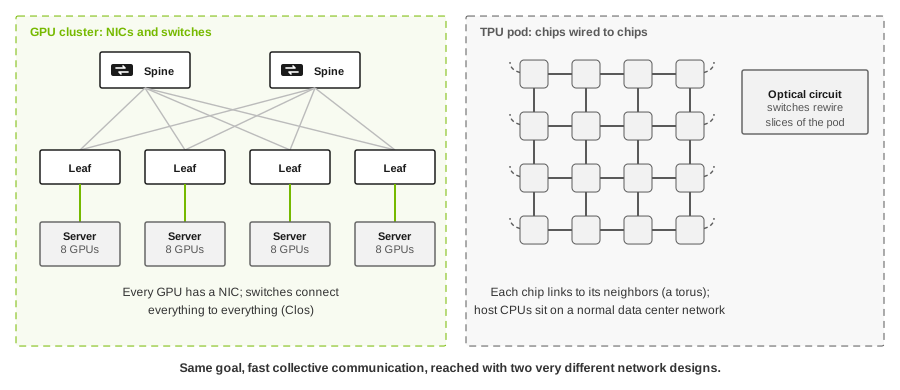
- GPU clusters give every GPU a network card and connect them through switches in a Clos fabric, over Ethernet (RoCEv2) or InfiniBand. Any GPU can reach any other in a few hops, which suits any communication pattern and any mix of jobs.
- TPU pods wire the chips directly to their neighbors in a torus (a grid whose edges wrap around), with no network cards or packet switches in between for chip-to-chip traffic. Optical circuit switches reconfigure which chips connect to which, carving the pod into slices for different jobs. It’s very efficient for the regular, neighbor-to-neighbor patterns of large training jobs, and less general than a Clos.
For a network engineer, the GPU model is the familiar one: switches, routing, congestion control, load balancing. That’s what most of this site and the book cover.
Key point. An idle accelerator costs the same as a busy one. Every network decision is judged by whether it keeps the GPUs busy.
What this means for network design
- The accelerator is the customer. Every design decision should be judged by one question: does it keep the GPUs busy?
- Bandwidth follows the GPU. One 400G or 800G port per GPU on the back-end, plus front-end and storage, means a single 8-GPU server can have more network bandwidth than an entire rack of traditional servers.
- Synchronization makes the tail matter. Because every GPU waits for the slowest exchange, worst-case latency and congestion matter more than averages.
- The CPU network still matters. Data loading, checkpoints, job control and user access all run over the front-end and storage networks. A starved storage network idles GPUs just as surely as a congested back-end.
Going further
- Where the GPU’s own network ends: NVLink, scale-up and where the fabric takes over.
- The six places an AI fabric congests: what slows step 4 down.
- RoCE lossless in one picture: how GPUs exchange data across the fabric.
- Chapters 2 and 3 of Building the AI Factory cover the GPU server and distributed training in depth.
References
- NVIDIA, H100 Tensor Core GPU (HBM3 at 3.35 TB/s, 700 W on the SXM form factor) and DGX B200.
- NVIDIA, GB300 NVL72: NVLink at 1.8 TB/s per GPU.
- Google Cloud, TPU architecture: TensorCores, MXU sizes (128 by 128 before v6e, 256 by 256 from v6e), and the optical circuit switches between cubes.
- Jouppi et al., TPU v4: An Optically Reconfigurable Supercomputer for Machine Learning, ISCA 2023: the torus topology and optical circuit switching.
- Supermicro, AMD EPYC 9005 series specifications: up to 192 cores and 12 DDR5 channels, about 614 GB/s theoretical memory bandwidth per socket.
- Google Cloud blog, BFloat16: the secret to high performance on Cloud TPUs.
Figures are typical of current data center hardware and vary by generation and vendor. Product names are trademarks of their respective owners.