Walk into a GPU data hall for the first time and the cabling looks wrong. Every server sends eight cables to eight different switches, often in another rack, while the switch on top of its own rack is nowhere in the picture. That’s a rail-optimized fabric, and once you see the traffic it carries, it’s the obvious way to build it.
This is the second article in the NCP-AIN study series, still in the design domain. Part 1 showed what training puts on the wire. This one turns that into a topology: which GPU talks to which, over what path, and how many switches you need.
In short
- A rail is one NIC position across all servers. NIC n of every server in a scalable unit connects to the same leaf, so GPU n talks to every other GPU n through one switch.
- NCCL makes most inter-server traffic same-rail. Its rings and trees pair GPUs by local index, and PXN moves cross-rail traffic over NVLink first, so it still crosses a single leaf.
- The switch radix sets everything. With k ports at GPU speed and 1:1 leaves, a rail leaf serves k/2 servers: 32 with a 64-port Quantum-2 switch, which is exactly the DGX SuperPOD H100 scalable unit.
- Rails change the failure domain. A rail leaf failure removes one NIC from 32 servers instead of every NIC from a few, so plan spares and placement for that.
What a rail is
In a classic data center, each server connects to the top-of-rack switch above it. In a GPU cluster built that way, all eight NICs of a server land on one leaf, and GPU 0 of server A reaches GPU 0 of server B through leaf, spine, leaf whenever the two servers sit under different leaves.
A rail-optimized fabric turns the wiring 90 degrees. Within a scalable unit, NIC 0 of every server connects to the rail 0 leaf, NIC 1 of every server to the rail 1 leaf, and so on:

NVIDIA’s DGX SuperPOD reference architecture with H100 describes it this way: each group of 32 nodes is rail-aligned, so traffic on a rail is one hop from the other 31 nodes in the scalable unit, and traffic between rails or between units goes through the spine layer. The compute fabric is described as rail-optimized, a balanced full fat-tree, with eight NDR400 connections per system.
Key point. A rail isn’t a separate network. It’s a wiring rule inside one Clos fabric that puts the GPUs that talk most under the same leaf.
Why the rule works: which GPUs talk
The rule only pays off because training traffic isn’t random. When NCCL builds rings and trees across servers, it connects GPU n on one server to GPU n on the next: data is first reduced over NVLink inside each server, then each GPU exchanges its share across the network through its own NIC, then the results are spread over NVLink again. Each local GPU index forms its own inter-server channel. With rails, every one of those channels stays on its own leaf.
NCCL exposes the behavior directly. NCCL_CROSS_NIC=0 forces a ring or tree to use the same NIC on every node, which never crosses rails; the default (2) prefers the same NIC but allows a different one when that performs better. On hosts with more than one NIC, the default keeps you rail-aligned in practice.
The three paths a GPU’s traffic can take
| Path | Example | Switches crossed | Notes |
|---|---|---|---|
| Inside the server | GPU0 to GPU3, same server | None: NVLink | 900 GB/s of NVLink bandwidth per GPU on DGX H100 |
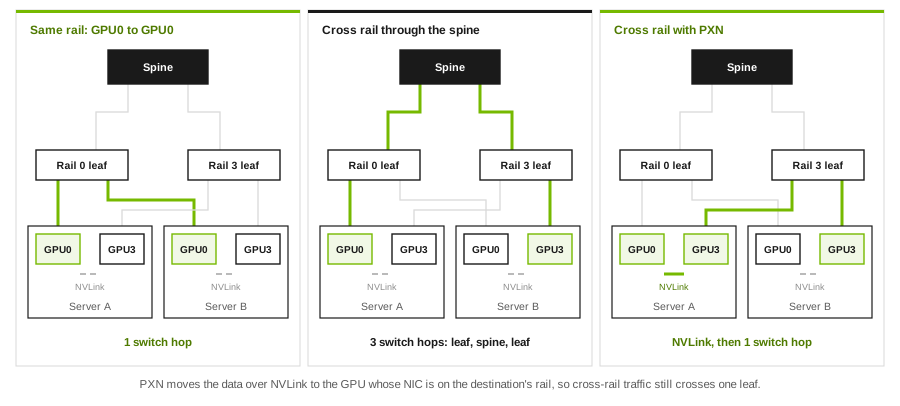
| Same rail, same unit | GPU0 of A to GPU0 of B | 1 (the rail leaf) | The path rings and trees use |
| Cross rail, no PXN | GPU0 of A to GPU3 of B | 3 (leaf, spine, leaf) | Uses spine bandwidth; more hops, more chances to collide |
| Cross rail, with PXN | GPU0 of A to GPU3 of B | NVLink, then 1 | NCCL hands the data to GPU3 of A over NVLink, which sends it on rail 3 |
| Different unit | Any GPU to a GPU in another unit | 3 or more | Rail alignment can extend to the top layer, as NVIDIA’s H100 design does |
PXN (PCI × NVLink) arrived in NCCL 2.12. A GPU writes the data over NVLink to an intermediate GPU on the same server whose NIC sits on the destination’s rail, and that NIC sends it. NVIDIA introduced it mainly to speed up all-to-all, where every GPU must reach every other GPU, so cross-rail traffic is unavoidable. NCCL_PXN_DISABLE=1 turns it off, which is useful when you want to see how much the spine is carrying without it.
The scalable-unit arithmetic
Everything in a rail-optimized design follows from one number: the switch radix k, counted in ports at the GPU’s link speed. With leaves at 1:1, half the ports face servers and half face spines.
| Quantity | Formula | Quantum-2 QM9700 (64 × 400G) | 128 × 400G Ethernet switch |
|---|---|---|---|
| Servers per rail leaf | k/2 | 32 | 64 |
| Rails | NICs per server | 8 | 8 |
| Leaves per scalable unit | Rails | 8 | 8 |
| GPUs per scalable unit | k/2 × 8 | 256 | 512 |
| Uplinks per unit | 8 × k/2 | 256 | 512 |
| Spines per unit, at 1:1 | Uplinks ÷ k | 4 | 4 |
| Two-tier ceiling (leaves ≤ k) | k²/2 GPU ports | 2,048 GPUs (8 units) | 8,192 GPUs (16 units) |
| Three-tier fat tree | k³/4 GPU ports | 65,536 | 524,288 |
The left column is NVIDIA’s H100 SuperPOD, derived rather than looked up. A QM9700 has 64 NDR 400 Gb/s ports on 32 OSFP cages, so a rail leaf at 1:1 serves 32 servers: that’s why the scalable unit is 32 DGX H100 systems. Eight rails give eight leaves per unit, and 256 uplinks need four 64-port spines, which matches the reference architecture’s 8 leaves and 4 spines per unit. NVIDIA tests up to four units (127 systems, with one slot used for UFM connectivity); the arithmetic allows eight before a third tier is needed.
The right column is the shape of a Spectrum-class Ethernet design with 128 ports of 400 Gb/s: twice the radix, twice the servers per rail leaf, four times the two-tier ceiling. The 2,048-GPU reference design on this site works through that case in full.
Rack-scale systems move the unit boundary. In NVIDIA’s GB200 reference architecture, a scalable unit is 8 DGX GB200 systems, 576 GPUs, each compute rack is rail-aligned with one leaf per rack, the fabric is a fully non-blocking fat tree within each unit, and the design scales to 16 units. The bigger NVLink domain doesn’t remove rails; it changes how much traffic has to use them.
What else sits next to the rails
A rail-optimized compute fabric is only one of the networks a GPU server touches. From the DGX SuperPOD H100 reference architecture and the DGX H100 user guide:
| Network | DGX H100 ports | Fabric in the reference design | Subscription |
|---|---|---|---|
| Compute (rails) | Eight single-port ConnectX-7, 400 Gb/s InfiniBand by default, on four OSFP ports | Quantum-2 QM9700, rail-optimized | Balanced full fat-tree |
| Storage | Two dual-port ConnectX-7, Ethernet by default, configurable to InfiniBand | QM9700, separate fabric | Storage nodes 1:1; DGX side about 4:3 |
| In-band management | Shared with the storage cards | SN4600C Ethernet | Not sized for collectives |
| Out-of-band | 1 GbE BMC port | SN2201 Ethernet | Management only |
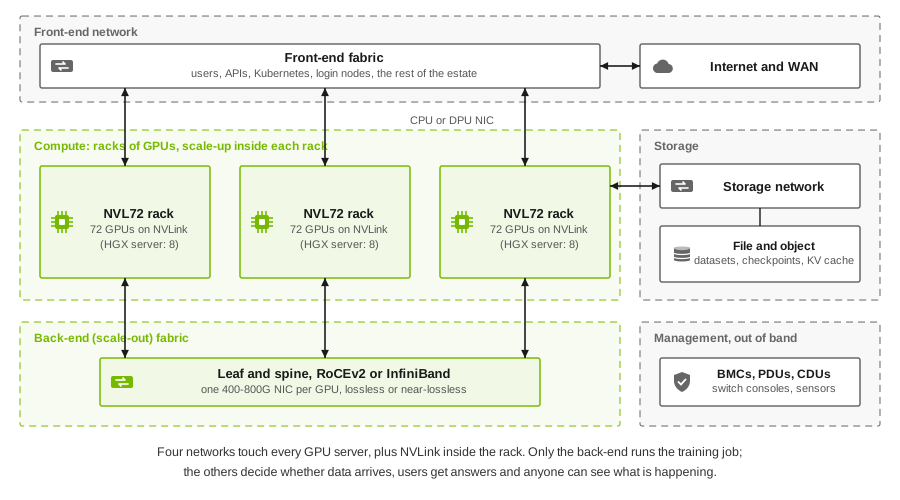
The design rule behind the table: collectives never share queues with storage or management traffic. The GB200 design keeps the same separation with one difference worth knowing: storage and in-band management share one Ethernet fabric there, separated logically with VXLAN, on BlueField-3 DPUs.
Rails or top-of-rack: the trade-offs
| Rail-optimized | Top-of-rack (all NICs on one leaf) | |
|---|---|---|
| Same-index GPU traffic in a unit | 1 switch hop | 1 hop if both servers share the leaf, else 3 |
| Spine load from collectives | Low: rings and trees stay on rails | High: most inter-server traffic crosses the spine |
| Leaf failure | Removes one NIC from every server in the unit (32 on QM9700) | Removes every NIC from the few servers on that leaf |
| Cabling | Long runs from every server to eight leaves, usually in the middle of the rows | Short runs inside the rack |
| Job placement | Any servers in the unit are equivalent | Servers under one leaf are better than others |
| Best fit | Large synchronized training | Mixed or independent workloads, front-end and storage networks |
The failure-domain row is the one to think about. A dead rail leaf degrades every server in the unit at once, because each loses one of its eight NICs. How a running job behaves depends on the NCCL version, its settings and the scheduler: it may stop and restart from its last checkpoint, or carry on with less bandwidth. Test it in your own environment before you need to know.
Verifying the rails
Rail designs are only as good as the cabling, and a swapped pair of cables is invisible to routing: everything comes up, and a single GPU’s traffic quietly takes the spine. Check from both ends. Illustrative commands; flags and output vary by release:
nvidia-smi topo -m        # GPU-to-NIC affinity: each GPU should be PIX (same PCIe switch) to exactly one NIC
ibdev2netdev              # RDMA device to interface mapping on the host (DOCA host stack / MLNX OFED)
ibstat                    # InfiniBand port state, rate and LID per HCA
iblinkinfo                # InfiniBand: every port and what it connects to; mlx5_0 of every server should land on the same leaf
lldpctl                   # Ethernet (with lldpd on the host): which switch and port each NIC connects to
Then tell NCCL what you intend, rather than relying on discovery alone:
export NCCL_IB_HCA==mlx5_0,mlx5_1,mlx5_2,mlx5_3,mlx5_4,mlx5_5,mlx5_6,mlx5_7   # '=' means exact names
export NCCL_CROSS_NIC=0                                                       # testing: never cross rails
NCCL_DEBUG=INFO ./build/all_reduce_perf -b 1G -e 8G -f 2 -g 1                 # compare busbw with and without
NCCL_IB_HCA also accepts optional rail and plane fields per device (<hca>[:<port>[:<rail>[:<plane>]]] in recent releases), which matters on multi-plane designs. A one-off run with NCCL_CROSS_NIC=0 and another with PXN disabled, compared against your baseline, tells you quickly whether the rails behave as designed.
Design rules to take away
- One NIC per GPU on the compute fabric, each on its own rail. Size every rail leaf at 1:1.
- Let the radix size the unit. Servers per unit = k/2; leaves per unit = rails; spines per unit = 8 × (k/2) ÷ k at 1:1.
- Know the two-tier ceiling (k²/2 GPU ports) before you buy, and decide the growth path (a third tier, or more units) at the design stage.
- Keep collectives on rails, and storage and management off them. Separate fabrics, or at least separate queues.
- Place jobs inside a unit when they fit, and verify cabling per rail before acceptance.
Self-check
1. A switch has 64 ports of 400 Gb/s. At 1:1 with eight-GPU servers, how many servers does a scalable unit hold, and how many spines does it need?
32 servers (k/2) and four spines: 8 leaves × 32 uplinks = 256 uplinks, divided by 64 ports per spine.
2. GPU 2 of server A sends to GPU 5 of server B in the same unit. Which switches does the traffic cross, with and without PXN?
Without PXN: rail 2 leaf, a spine, rail 5 leaf. With PXN: NVLink from GPU 2 to GPU 5 inside server A, then the rail 5 leaf only.
3. Which NCCL setting keeps rings and trees on the same NIC across nodes, and what is its default?
NCCL_CROSS_NIC. 0 never crosses rails; the default 2 prefers the same NIC but allows a different one when it performs better.
4. What is the largest two-tier, 1:1 fabric you can build with 128-port switches, in GPU ports?
k²/2 = 128 × 128 / 2 = 8,192.
5. A rail leaf fails. Compare the impact with a top-of-rack design.
Every server in the unit loses one NIC (one-eighth of its scale-out bandwidth) instead of a few servers losing all of theirs. More servers are affected, each less severely; job behavior depends on NCCL and should be tested.
What’s next
That closes the design domain. Article 3 starts the largest part of the exam, Spectrum-X: what the Spectrum switch and the SuperNIC each do, and how they cooperate on adaptive routing and congestion control.
References
- NVIDIA, DGX SuperPOD reference architecture (H100): network fabrics: 32-node rail-aligned units, 8 leaf and 4 spine switches per unit, separate storage, in-band and out-of-band fabrics.
- NVIDIA, DGX SuperPOD reference architecture (H100): key components: a rail-optimized, balanced full fat-tree with eight NDR400 connections per system, Quantum QM9700 switches, four tested units.
- NVIDIA, DGX SuperPOD reference architecture (GB200): network fabrics: 576-GPU units, rail-aligned racks, a fully non-blocking fat tree per unit, up to 16 units.
- NVIDIA, DGX H100 user guide: eight single-port ConnectX-7 cards on four OSFP ports, two dual-port ConnectX-7 cards for storage and in-band, NVLink at 900 GB/s.
- NVIDIA, QM97x0 switch user manual: 64 NDR 400 Gb/s ports on 32 OSFP cages, 51.2 Tb/s.
- NVIDIA, NCCL environment variables: NCCL_CROSS_NIC, NCCL_PXN_DISABLE, NCCL_IB_HCA.
- NVIDIA Technical Blog, Doubling all2all performance with NCCL 2.12: PXN.
- Related on this site: ASN plans for rail-optimized fabrics, oversubscription in AI fabrics and scale-up versus scale-out.
This guide follows NVIDIA’s public blueprint and documentation; it contains no exam content. Commands are illustrative: validate them against the documentation for your release. NVIDIA, NCCL, DGX, Quantum, Spectrum and ConnectX are trademarks of NVIDIA Corporation.